
Artificial intelligence has moved from experimentation into operational infrastructure. Stanford’s 2026 AI Index reports that organisational AI adoption has reached 88%, while generative AI achieved approximately 53% population adoption within three years. Yet adoption is not the same as productivity. McKinsey’s 2025 global survey found that most organisations still struggle to convert pilots into scaled business impact; the companies generating the greatest value are redesigning workflows, assigning senior ownership and defining when humans must validate AI output.
The commercial implication is decisive: businesses should stop asking which AI tool is “best” and start asking which measurable bottleneck each tool will remove.
Research supports that distinction. In a major field study, customer-support agents using generative AI resolved nearly 14% more cases per hour, while gains among less experienced workers were considerably larger. A separate six-month experiment involving approximately 6,000 knowledge workers found that employees actively using AI spent around three fewer hours per week on email, although meeting time did not fall significantly. AI therefore creates the greatest value where work is information-intensive, repeatable and individually controllable—not where productivity depends on unresolved organisational coordination.
The Decision Framework: Buy Outcomes, Not Features
An effective AI stack should improve one of five measurable outcomes:
- time saved per recurring task;
- quality or consistency of output;
- volume of work completed;
- speed of decision-making;
- revenue, conversion or customer experience.
A licence that saves a highly paid employee three hours a week may produce a strong return. A cheaper tool used irregularly may create almost none. Businesses should therefore assess AI through workflow frequency × labour cost × achievable improvement, then subtract licence, integration, review and governance costs.
The tools below are selected not because they perform every task, but because each has a credible role in a specific operating model.
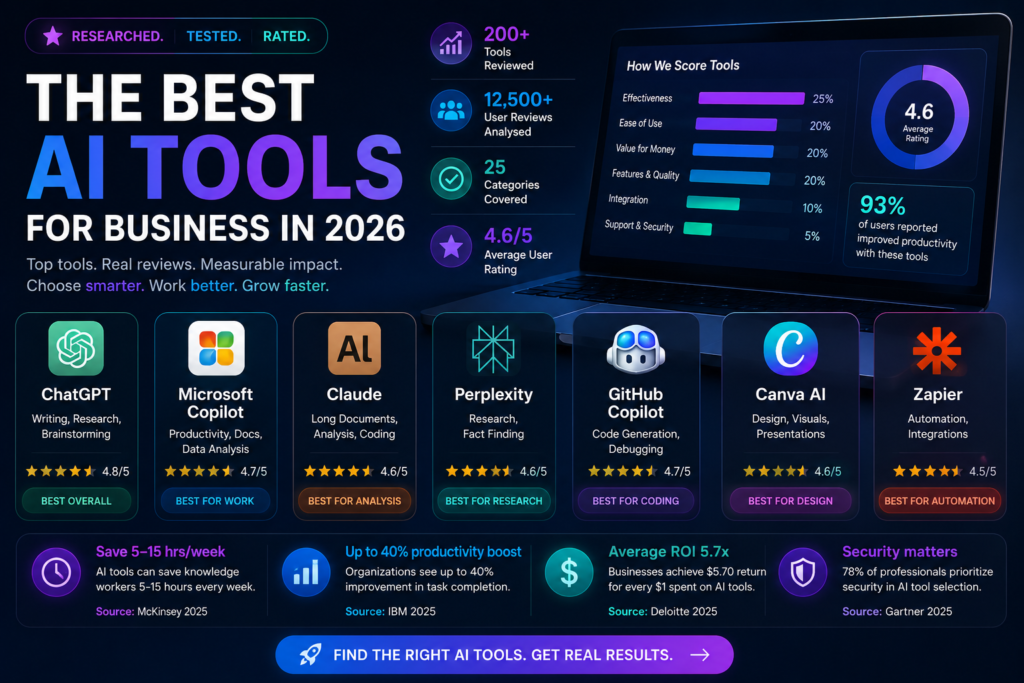
1. ChatGPT: Best General-Purpose AI for Cross-Functional Businesses
ChatGPT is the strongest general-purpose choice for organisations that need one platform spanning research, analysis, writing, data interpretation, document creation and agent-assisted work.
OpenAI’s business offering now extends beyond conversational assistance. Its workplace products support document, spreadsheet and presentation creation, business controls and connections to organisational tools. ChatGPT Business is listed at $20 per user per month, while enterprise plans add expanded administration, governance and security capabilities.
Best suited to: consultancies, professional-services firms, start-ups, strategy teams, marketers, analysts and small businesses without a deeply standardised software environment.
Highest-value uses: preparing first drafts, synthesising multiple documents, developing business cases, analysing datasets, producing meeting outputs and accelerating research.
Why it creates value: it consolidates several categories of knowledge work into one interface, reducing the need to buy separate writing, analysis and ideation applications.
Main risk: its breadth can encourage unstructured use. Employees may produce faster output without improving decisions. Businesses should create approved use cases, reusable prompts and validation standards rather than merely distributing licences.
2. Microsoft 365 Copilot: Best for Microsoft-Centred Organisations
Microsoft 365 Copilot is most valuable where employees already spend their working day in Outlook, Teams, Word, Excel and PowerPoint.
Its strategic advantage is context. A standalone chatbot requires users to upload or explain information. Copilot can work inside the productivity environment where emails, meetings, documents and spreadsheets already exist. Microsoft also provides Copilot Chat without an additional charge for eligible Microsoft Entra users, while its full paid business offering is priced at approximately $32 per user per month when paid annually on the current US pricing page.
Best suited to: government, financial services, large professional organisations, regulated businesses and companies already standardised on Microsoft 365.
Highest-value uses: summarising long email chains, extracting meeting actions, drafting documents from internal material, interrogating spreadsheets and preparing presentations.
Why it creates value: productivity gains are embedded in existing work rather than requiring employees to create a new behaviour or switch applications.
Main risk: a premium licence cannot repair poor document management. If permissions, naming conventions and SharePoint structures are weak, Copilot can surface fragmented or misleading information faster. Data governance should precede broad deployment.
3. Google Workspace with Gemini: Best for Google-Native Teams
Gemini for Google Workspace is the logical choice for organisations built around Gmail, Docs, Sheets, Meet and Drive.
Google now includes AI capabilities across Workspace plans, with functions including email summarisation, drafting, document assistance, meeting support and source-grounded research through Gemini Notebook, previously known as NotebookLM.
Best suited to: digital agencies, education providers, collaborative start-ups, remote teams and businesses whose knowledge base already sits in Google Drive.
Highest-value uses: creating documents collaboratively, summarising communication, extracting knowledge from internal sources and converting meeting discussions into actions.
Why it creates value: the AI is positioned within a highly collaborative cloud environment, reducing friction between generation, editing and sharing.
Main risk: businesses using mixed Microsoft and Google environments may create duplication, inconsistent access controls and additional integration cost. Select the ecosystem that contains the majority of business-critical work.
4. Claude: Best for Complex Reading, Reasoning and High-Stakes Drafting
Claude is especially valuable for work involving long documents, careful synthesis, coding and sustained analytical reasoning.
Anthropic offers individual, team and enterprise options. Claude Pro is currently listed at $20 per month, while higher-capacity Max plans cost $100 or $200 monthly. Enterprise plans add security controls such as single sign-on and domain management, although enterprise usage may be billed separately at API rates.
Best suited to: legal teams, policy professionals, researchers, developers, compliance functions and organisations handling complex written material.
Highest-value uses: reviewing contracts and reports, comparing policies, producing structured analysis, explaining code and drafting detailed professional documents.
Why it creates value: Claude is strongest where answer quality depends on preserving context across substantial source material rather than producing a rapid generic response.
Main risk: polished reasoning can still conceal incorrect assumptions. High-stakes legal, financial, regulatory or technical outputs require source checking and named human accountability.
5. Perplexity Enterprise: Best for Fast, Source-Led Research
Perplexity Enterprise is designed for research workflows where users need direct citations and rapid navigation across web and internal information.
Enterprise Pro costs $40 per seat monthly or $400 annually, while Enterprise Max is priced substantially higher at $325 monthly. The platform positions itself as a secure research environment capable of orchestrating multiple models across files, tools and external sources.
Best suited to: market-intelligence teams, consultants, journalists, investment analysts, procurement functions and competitive-research teams.
Highest-value uses: market scans, competitor monitoring, evidence discovery, supplier research and early-stage due diligence.
Why it creates value: it reduces the time required to locate and compare evidence, particularly when the alternative is opening and reviewing many separate search results.
Main risk: citations improve traceability but do not guarantee quality. Teams must still distinguish primary evidence from secondary commentary and weak sources.
6. GitHub Copilot: Best for Established Software Teams
GitHub Copilot is strongest when deployed inside professional development workflows rather than treated as a general chatbot.
It uses code, open files, repository context, frameworks and dependencies to generate suggestions, explain code and support agent-based development. Business controls allow organisations to define boundaries, manage access and apply governance across development teams.
Best suited to: software companies, internal engineering teams, digital product functions and organisations maintaining substantial codebases.
Highest-value uses: boilerplate generation, tests, documentation, refactoring, code explanation and accelerating routine development.
Why it creates value: it places AI directly in the integrated development environment, where developers experience the bottleneck.
Main risk: faster code production can increase technical debt if review discipline weakens. Productivity should be measured through deployment frequency, defects, cycle time and rework—not lines of code generated.
7. Canva AI: Best for Small Marketing and Communications Teams
Canva AI and Magic Studio provide a high-value route for businesses that need frequent visual content but cannot support a full design function.
Canva Pro includes more than 40 AI-powered tools alongside templates, stock content, video, image and brand features. Magic Design can generate editable design directions from text and uploaded media, while enterprise plans add organisational controls and brand management.
Best suited to: small businesses, charities, schools, social-media teams, internal communications and decentralised marketing functions.
Highest-value uses: presentations, campaign graphics, social posts, short videos, recruitment material and branded internal communications.
Why it creates value: it reduces both production time and dependency on scarce design capacity.
Main risk: ease of creation can produce excessive, inconsistent content. Locked templates, brand kits and approval rules are essential for quality control.
8. Zapier: Best for Repetitive Cross-System Work
Zapier is the strongest choice where productivity is constrained not by content creation but by information moving manually between applications.
The platform connects more than 9,000 applications and is used by over three million businesses, supporting workflows, AI steps and agents across business systems. Paid plans begin around $19.99 monthly, although costs depend on task volumes and, from June 2026, selected AI model tiers can consume different numbers of tasks.
Best suited to: e-commerce firms, sales teams, recruiters, service businesses and operations functions using several cloud applications.
Highest-value uses: routing leads, updating CRM records, triggering communications, processing forms, generating summaries and transferring data between systems.
Why it creates value: it eliminates repeated hand-offs. Automating a five-minute task performed 100 times a week saves more value than accelerating an occasional two-hour report.
Main risk: poorly designed automation scales errors. Every workflow should have an owner, exception route, audit trail and failure notification.
The Pragmatic AI Stack
Most businesses do not need eight AI subscriptions.
A small professional firm may need ChatGPT plus Canva. A Microsoft-based enterprise may gain more from Copilot plus a governed automation layer. A software company may prioritise Claude and GitHub Copilot. A consultancy may combine Perplexity for evidence discovery with ChatGPT or Claude for synthesis.
The correct adoption sequence is equally important:
- identify a frequent, measurable bottleneck;
- select one tool close to the existing workflow;
- establish a baseline for time, cost, quality or volume;
- run a controlled pilot;
- train users to verify outputs;
- scale only when measurable value exceeds total operating cost.
Recent experimental evidence shows that AI gains vary significantly according to a user’s ability to elicit, filter and verify output. High-performing users can achieve substantial benefits, while poorly trained users may gain little or even produce worse results. Standard workflows and focused training reduce that performance gap.
The best AI tool is therefore not the one with the largest model or longest feature list. It is the one embedded in a well-designed workflow, used by capable employees, governed in proportion to risk and measured against a real business outcome. In 2026, productivity advantage will come less from possessing AI than from knowing precisely where and where not to use it.